Endpoint Central Agent Uninstallation methods for Tickets 21030 and 15845
Agent Uninstallation Methods
The Endpoint Central
Agent can be uninstalled in many ways. However it is important to note here
that agent uninstallation is only recommended in cases where you want to remove
old agents (agents that are no longer in contact with the server)and not in scenarios
where there is a communication issue or an upgradation failure.
You can uninstall
agents from machines using the Endpoint Central Server by navigating to
the Agent tab --> Scope of Management --> Computers --> Uninstall Agent
.
By clicking on
Uninstall agent, you will only be able to uninstall agents from machines where
the status of the agent is live.
Note: Uninstalling an
agent from the console using the Uninstall Agent option is different from removing the
computers using the Remove Computers option.The agent will be uninstalled on-demand when you
click Uninstall Agent
. If you are removing a computer, the agent uninstallation will
only be reflected in the next refresh policy.
You can restrict agent
uninstallation and agent service from the Endpoint Central Server console by
following the steps mentioned below:
To configure OTP for
agent uninstallation, log in to the Endpoint Central Server console and
navigate to Agent --> Agent Settings --> Agent Protection Settings
.
After enabling the
settings, you will see that the restrictions will be enabled in the control
panel. (The restrictions will be applied during the 90 minutes refresh cycle)
When you are trying to
uninstall the agent from the control panel, you will be required to enter the
TOTP.
To view the TOTP from
the console, log in to the Endpoint Central web console and navigate to Agent --> Computers --> View OTP
.
Note: If the
restriction is not enabled in the Endpoint Central Server, you can directly
uninstall the agent from the control panel.
Uninstall Windows Agent with AgentCleanupTool
Note:
If the Endpoint Central server is uninstalled and you
still have the Endpoint Central agents
in your machine, please contact support with Endpoint Central Agent registry export.
The Endpoint Central support
will provide the AgentCleanupTool for proper cleanup of the agent.
For Endpoint Central Cloud,
please contact the support for the AgentCleanupTool with any one agent registry
export.
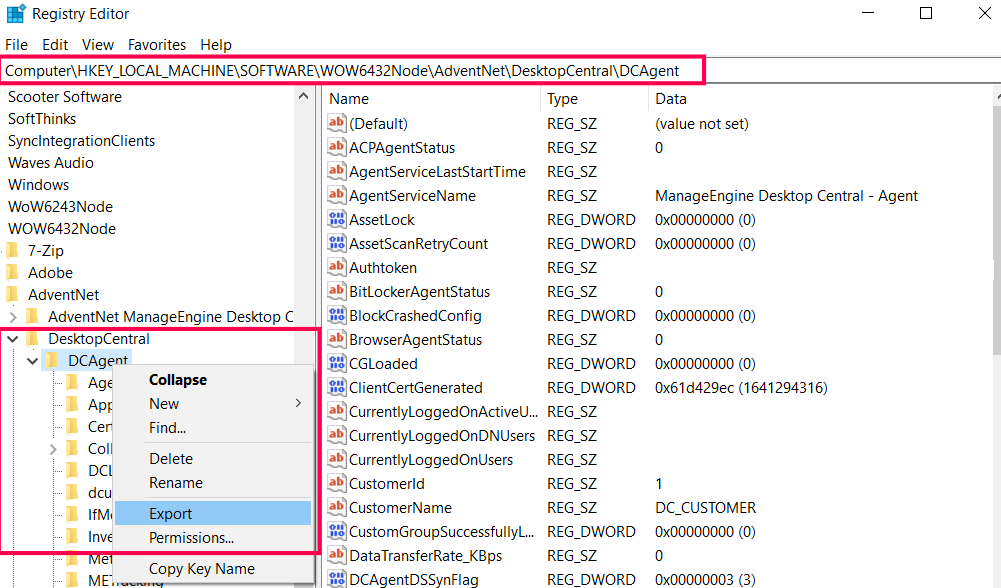
If you don't fall under the above mentioned cases,
Downloading
the AgentCleanupTool
- Download the
AgentCleanupTool.exe (SHA 256 Checksum: 7135c425399e3f157937fe9ae259b553150ca59c79bd8654b3077f5632a9cc89)
Executing
the AgentCleanupTool
- Execute the AgentCleanupTool.exe as an administrator in the server installed machine to generate the AgentCleanupToolClient.exe.
Uninstalling
the Agent with AgentCleanupToolClient
- The AgentCleanuptoolClient.exe is now deployed to the agents which are under the Scope Of Management.
- Run this AgentCleanupToolClient.exe in the agent machine, as an administrator to remove the agent.
Note
:
1. The
AgentCleanupToolClient will be valid only for 48 hours.
2. Do
not rename either of the files.
3. The
Client tool should not be executed from the agent installed directory.
4. If the
AgentCleanupToolClient.exe has expired, regenerate the AgentCleanupToolClient
and execute the same in the agent machine.
Related Articles
Endpoint Central - (Incorrect URL in User Invitation Emails)
Knowledge Base Article: Resolving Incorrect URL in Endpoint Central User Invitation Emails Article ID: KB-EC-0047 Last Updated: January 16, 2026 Applicable Product: ManageEngine Endpoint Central (On-Premises) Version: All versions supporting Secure ...Endpoint Central - (OS Deployer Network Driver Installation Failures)
Knowledge Base: Resolving OSDeploy Network Driver Installation Failures in ManageEngine Endpoint Central Overview This article provides a systematic approach to diagnosing and resolving network driver installation failures during OS deployment for ...Endpoint Central - Network Card is not installing while deploying the Image using the OS Deployer.
Issue Observed: The network adapter does not work after deployment unless it is manually unplugged and plugged back in. Root cause appears to be that Windows fails to detect the network adapter during boot. Troubleshooting Performed: Troubleshooting ...